
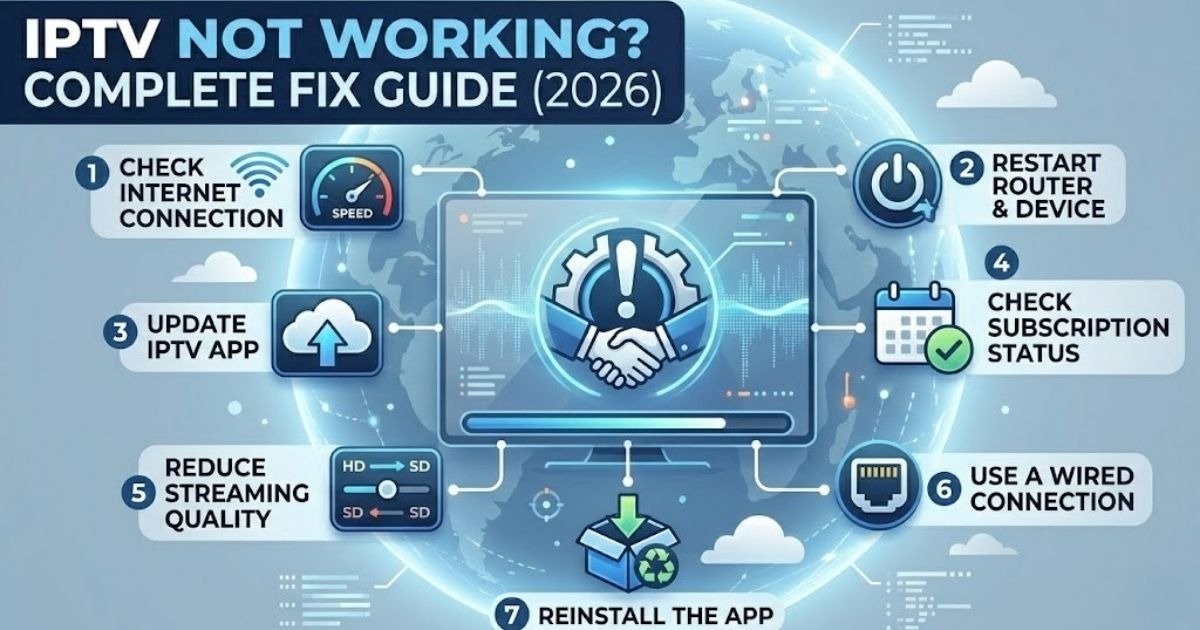
Does your IPTV not boot up and spoil your favorite show or live sports match? You’re not alone.
The most common IPTV issues in 2026 are buffering, black screens, and login failures, but practically all of them can be resolved. This guide covers all the key causes and the quickest fixes to get you back to streaming within minutes.
Why Is My IPTV Not Working?
Before rushing into the fixes, it helps to understand why IPTV stops working. The most common causes are:
- Slow or unreliable internet connection. At minimum, IPTV requires 10 to 25 Mbps for HD, and 25 Mbps or higher for 4K IPTV Canada streams.
- Old software. Outdated apps cause playback errors and crashes.
- Overloaded IPTV server. Peak hours and live sporting events put heavy load on provider servers.
- Lapsed subscription. This results in no streams at all.
- ISP throttling or blocking. Some ISPs actively block IPTV traffic.
- Corrupted cache files. Stored temporary files slow down and crash the app.
Knowing the root cause saves time and leads you to the right fix faster.
Fix 1: Check Your Internet Connection
A weak connection is the number one cause of IPTV failure. Do this first:
Visit Speedtest.net and run a speed test on the device you are streaming on. HD IPTV requires 10 Mbps and Ultra HD or 4K requires 25 Mbps. If your speed is fine but IPTV keeps buffering, switch from Wi-Fi to Ethernet. A wired connection removes signal noise immediately.
Pro Tip: Disconnect other devices from your network while streaming to free up bandwidth.
Fix 2: Restart Your Device and Router
This works better than most people expect. Here is how to do it properly:
Switch off your IPTV device and router. Wait 60 to 120 seconds, not less. Turn the router on first and wait 2 minutes, then turn on your IPTV device. This clears memory glitches and creates a fresh connection to your provider’s server.
Fix 3: Clear the App Cache
Too much cached data slows your app down. Here is how to clear it:
Android / Fire TV: Settings, then Apps, find your IPTV app, then Clear Cache.
Smart TV: Settings, then App Manager, select the app, then Clear Cache.
iOS: Uninstall and reinstall the app.
Android Box: Settings, then Apps, then Storage, then Clear Cache Data.
Repeat this every month to keep your IPTV app running smoothly.
Fix 4: Update Your App and Device Firmware
An outdated app version is a very common reason IPTV stops working. Keep everything updated:
Firestick / Android Box: Settings, then Device, then About, then Check for Updates.
Smart TV: Settings, then System, then Software Update.
IPTV App: Visit the Play Store or App Store and update the app.
New updates fix bugs, improve compatibility, and increase stream stability.
Fix 5: Check Your Subscription Status
A lapsed subscription is easy to forget. If your IPTV has suddenly stopped working, log into your provider’s panel and check your expiry date. Renew your plan if it has expired, then restart the app.
Some providers also suspend accounts when connection limits are exceeded, so contact support if that might be the case.
Fix 6: Fix ISP Blocking or Throttling
In Canada, some ISPs block or slow down IPTV traffic. Signs include IPTV working on mobile data but not on home Wi-Fi, speed test showing normal results but streams still buffering, and channels dropping without warning.
To fix this, change your DNS to Google DNS (8.8.8.8 / 8.8.4.4) or Cloudflare (1.1.1.1). You can also use a VPN to bypass ISP throttling, but only try this if IPTV is genuinely not working, since a VPN can add lag to a connection that is already fine.
Fix 7: Reinstall the IPTV App
If nothing else works, reinstalling the app can fix deep app errors. Uninstall the IPTV app fully, restart your device, then download the latest version from an official platform. Enter your login details or M3U URL again. This resolves login errors, authorization failures, and app crashes in most cases.
IPTV Quick Fix Table
| Problem | Quick Fix |
| Black screen | Test internet speed, switch to another stream |
| Buffering every few seconds | Switch to Ethernet, lower stream quality |
| Channels not loading | Clear cache, restart app |
| Login error | Check subscription status, reinstall app |
| EPG not showing | Refresh EPG in app settings, check timezone |
| App keeps crashing | Update app, clear app data |
Best IPTV Providers in Canada (2026)
If your current provider keeps failing, it might be time to switch. The best IPTV Canada packages offer stable servers, 4K IPTV Canada streams, Ultra HD IPTV, and reliable support.
WatchingIPTV.com is one of the best options for Canadian users. It offers a large number of live channels, on-demand content, Ultra HD and 4K streams, and a fast support team. A solid choice if you are tired of constant IPTV issues.
TV Canadian offers good channel variety with multi-device support.
Fluxus IPTV is a budget-friendly option with reasonable stream quality.
For a full comparison, visit the WatchingIPTV.com guide to Best IPTV Canada 2026 and choose a plan.
FAQs: IPTV Not Working
Q: Why did my IPTV stop working suddenly? Most sudden failures are due to a server issue on your provider’s side, a lapsed subscription, or a network glitch. Restart your router and device first, then contact your provider.
Q: What internet speed do I need for IPTV? HD requires 10 Mbps, Full HD needs 20 Mbps, and 4K IPTV Canada or Ultra HD IPTV streams require 25 Mbps or more.
Q: Is Ethernet better than Wi-Fi for IPTV? Always use Ethernet if you can. A wired connection is more stable and removes most buffering problems immediately.
Q: Why does my IPTV buffer even with fast internet? Your ISP may be throttling IPTV traffic, or your provider’s server may be overloaded. Try changing your DNS settings or use a VPN temporarily to test.
Q: What should I do if IPTV is not working on my Smart TV? Update your TV firmware, clear the app cache, and check your internet connection. If the app keeps failing, uninstall and reinstall it, or try accessing IPTV through a web portal.
Q: Is IPTV legal in Canada? Using IPTV is not illegal as long as you use a licensed and legitimate service. Always make sure your provider is authorized to distribute the content they offer.
Get Started with the Best IPTV in Canada
If you are tired of paying too much for cable and want something that actually works, WatchingIPTV has you covered.
Browse our pricing plans and pick what suits your budget. Want to know more before deciding? Our Best IPTV Canada 2026 page has everything you need. Still have questions? Simply contact our team and we will help you out.

No Responses